ID Verification
The ID Verification API performs OCR on identity documents (passports and national ID cards) and returns the parsed data as a clean, grouped result. It is a standalone service — it does not require a KYC submission or any onboarding state.
Try it in the playground →Overview
Use this endpoint to verify an identity document on its own — for example, to embed Azakaw's ID parsing in your own portal without going through Azakaw's onboarding UI.
For each request the API will:
- Run OCR on the uploaded document (image or PDF).
- Extract the document, holder, date, and verification fields.
- Return an overall document status and the holder portrait/signature.
At a glance
You send a document image; you get back structured data plus the holder's cropped photo (returned as base64).
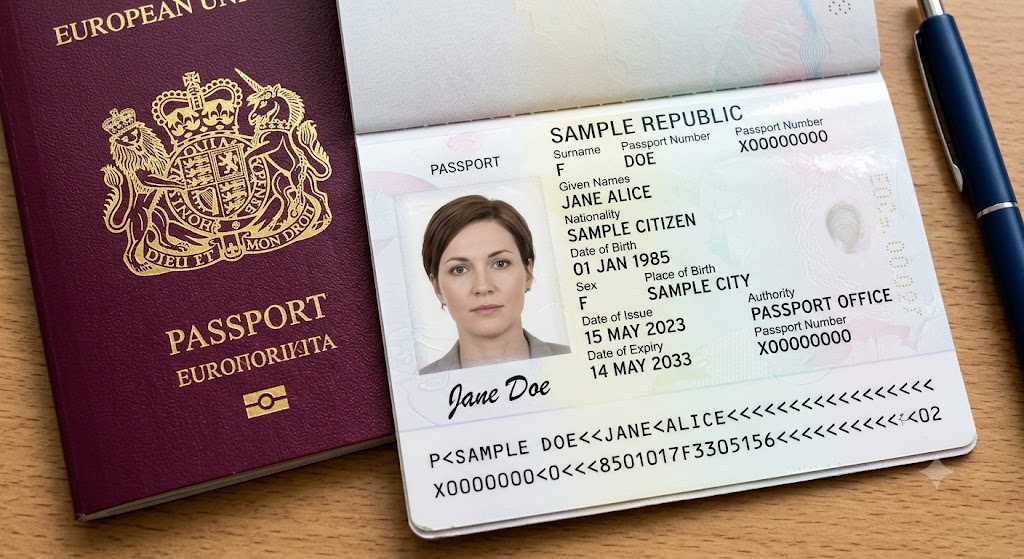

(
images.portrait, base64)Authentication
All requests require a bearer token in the Authorization header:
Authorization: Bearer your-token-here
See Authentication. This endpoint requires an application token (issued via GetAppToken / AppSessionManager), not an interactive user/portal session. Application tokens automatically include the services: External claim the gateway enforces — here External is just the platform's marker for an app-integration token; it has nothing to do with your API's end users. A token without that claim is rejected with 403.
Verify an ID Document
POST {base_url}/ExtDocumentVerification/Verify
Request
Sent as multipart/form-data.
| Field | Type | Required | Description |
|---|---|---|---|
FileContent | File | Yes | The document. Supported formats: JPG, PNG, BMP, TIFF, and PDF (including multi-page). The document type is auto-detected — no type hint is needed. |
Example
curl --location '{base_url}/ExtDocumentVerification/Verify' \
  --header 'Authorization: Bearer your-token-here' \
  --form 'FileContent=@"/path/to/passport.pdf"'
Response
{
  "version": null,
  "statusCode": 200,
  "messages": [
    "Processed successfully"
  ],
  "result": {
    "document": {
      "name": "United Kingdom - Passport (2015)",
      "description": "Passport",
      "format": "TD3",
      "year": "2015",
      "issuingCountryIcao": "GBR",
      "issuingCountryIso2": "GB",
      "number": "123456789",
      "personalNumber": null,
      "authority": "HMPO",
      "placeOfIssue": null,
      "chipPresent": true,
      "typeMatchScore": 0.86,
      "mrz": "P<GBRDOE<<JANE<<<<<<<<<<<<<<<<<<<<<<<<<<<<<<\n1234567897GBR9001011F3001012<<<<<<<<<<<<<<00",
      "mrzLines": [
        "P<GBRDOE<<JANE<<<<<<<<<<<<<<<<<<<<<<<<<<<<<<",
        "1234567897GBR9001011F3001012<<<<<<<<<<<<<<00"
      ]
    },
    "holder": {
      "nativeSurname": null,
      "nativeGivenName": null,
      "gender": "F",
      "nationalityIcao": "GBR",
      "nationalityIso2": "GB",
      "dateOfBirth": "1990-01-01",
      "placeOfBirth": null
    },
    "sources": {
      "mrz": {
        "surname":   { "value": "DOE",  "confidence": 100, "sourceType": "Recognized", "originalValue": "DOE" },
        "givenName": { "value": "JANE", "confidence": 99,  "sourceType": "Recognized", "originalValue": "JANE" },
        "middleName": null,
        "fullName":  { "value": "DOE JANE", "confidence": 99, "sourceType": "Recognized", "originalValue": "DOE  JANE" }
      },
      "visual": {
        "surname":   { "value": "DOE",      "confidence": 98, "sourceType": "Recognized", "originalValue": "DOE" },
        "givenName": { "value": "JANE",     "confidence": 96, "sourceType": "Recognized", "originalValue": "JANE" },
        "middleName": { "value": "MARGARET", "confidence": 94, "sourceType": "Recognized", "originalValue": "MARGARET" },
        "fullName":  { "value": "JANE MARGARET DOE", "confidence": 0, "sourceType": "Derived", "originalValue": null }
      }
    },
    "dates": {
      "issue": null,
      "expiry": "2030-01-01"
    },
    "verification": {
      "overallStatus": "OK",
      "documentNumber": "OK",
      "dateOfBirth": "OK",
      "expiry": "OK",
      "personalNumber": null,
      "finalChecksum": "OK"
    },
    "authenticity": {
      "imageQuality": "Failed",
      "imageQualityChecks": [
        { "check": "ImageFocus",      "status": "OK" },
        { "check": "ImageGlares",     "status": "OK" },
        { "check": "Portrait",        "status": "OK" },
        { "check": "Bounds",          "status": "Failed" },
        { "check": "Perspective",     "status": "OK" },
        { "check": "ImageResolution", "status": "Failed" }
      ],
      "mrzVisualMatchScore": 1.0,
      "checks": {
        "documentType": "OK",
        "mrz": "OK",
        "expiry": "OK",
        "security": "NotChecked",
        "text": "OK"
      }
    },
    "images": {
      "portrait": "/9j/4AAQSkZJRgABAQAAAQ... (base64)",
      "signature": "/9j/4AAQSkZJRgABAQAAAQ... (base64)",
      "ghostPortrait": "/9j/4AAQSkZJRgABAQAAAQ... (base64)",
      "documentImage": "/9j/4AAQSkZJRgABAQAAAQ... (base64)"
    }
  }
}
Any field not present on the document — or not extractable — is returned as null.
Response Fields
document
| Field | Type | Description |
|---|---|---|
name | string | Specific document name detected by extraction (e.g. United Kingdom - Passport (2015)). |
description | string | Document type/description detected by extraction (e.g. Passport). Auto-detected — not caller-supplied. |
format | string | ICAO MRZ family: TD1, TD2, or TD3. null when the document has no MRZ. |
year | string | Document edition/year from our extraction's template DB. |
issuingCountryIcao | string | Issuing country — normally the document's ICAO 3-letter code (e.g. GBR, IND); falls back to the country name when the document carries no clean code. |
issuingCountryIso2 | string | Issuing country resolved to ISO 3166-1 alpha-2 (e.g. GB). Falls back to the raw ICAO value (issuingCountryIcao) when it can't be resolved. |
number | string | Document / passport number. |
personalNumber | string | Personal/national number from the MRZ optional-data field, when present. |
authority | string | Issuing authority, when printed. |
placeOfIssue | string | Place of issue, when printed. |
chipPresent | boolean | true when the document has an RFID/NFC chip. |
typeMatchScore | number | Confidence that the document matches the detected template, scale 0–1 (note: this differs from sources.*.confidence, which is 0–100). |
mrz | string | Full raw machine-readable zone, lines joined by \n. |
mrzLines | string[] | The same MRZ split into its lines — 3 for TD1, 2 for TD2/TD3. Empty when the document has no MRZ. Use this, not sources.*.originalValue, for ICAO character-ceiling or truncation checks — it is the only field that keeps the < padding. |
holder
Latin given/surname/middle are not here; they're under sources so you can choose the reading. holder carries the unambiguous fields.
| Field | Type | Description |
|---|---|---|
nativeSurname | string | Surname in the document's native non-Latin script. null for Latin-script documents. |
nativeGivenName | string | Given name in the document's native non-Latin script. null for Latin-script documents. |
gender | string | M, F, or X (unspecified / other, per ICAO 9303). null when the document leaves it blank. |
nationalityIcao | string | Nationality — normally the document's ICAO 3-letter code (e.g. GBR, IND); may be a longer name when the document has no MRZ code. |
nationalityIso2 | string | Nationality resolved to ISO 3166-1 alpha-2 (e.g. GB). null if it isn't a recognised country. |
dateOfBirth | string (YYYY-MM-DD) | Date of birth. |
placeOfBirth | string | Place of birth, when printed. |
sources
The holder's Latin name is returned as two independent readings — mrz (machine-readable zone) and visual (printed/photo zone) — each with our extraction's confidence. We don't pick a winner; choose the source you trust (MRZ is the authoritative transliteration; Visual can be more complete but is more prone to OCR slips like O→0). Either source, or any field, is null when not read.
| Field | Type | Description |
|---|---|---|
mrz.surname / visual.surname | Reading | Family name from that source. null if the source carries no surname. |
mrz.givenName / visual.givenName | Reading | Given name(s) from that source. |
mrz.middleName / visual.middleName | Reading | Middle name when present as a separate field (e.g. Philippine passports); usually only on visual. |
mrz.fullName / visual.fullName | Reading | Surname and given names as one combined value. Useful for documents that print the name as a single field rather than as separate surname / given-name components. null when the source carries no name. |
Every Reading above is an object with four keys:
| Key | Type | Description |
|---|---|---|
value | string | The cleaned reading. |
confidence | number | Minimum per-character recognition probability for the reading, 0–100. |
sourceType | string | Recognized — the value was read from the document, and per-character recognition data was returned for it. Derived — the value was generated by extraction rather than read off the document. |
originalValue | string | The value as it appears on the document, before normalisation — e.g. "DOE JANE" where value collapses the double space. null on Derived readings, which have no on-document source. |
confidence is the minimum per-character recognition probability across the reading. On a Derived reading it does not describe the returned value and is frequently 0; a Derived reading is a generated value, not a failed one. Use sourceType, not confidence, to distinguish the two. A Recognized reading with low confidence indicates genuine recognition difficulty and is the case to route to review.
originalValue is the on-document form of the value, not the padded MRZ. MRZ filler (<) is resolved to spaces on name fields and retained only on raw fields. For the padded form — ICAO character-ceiling and truncation checks — read document.mrzLines.
dates
| Field | Type | Description |
|---|---|---|
issue | string (YYYY-MM-DD) | Date of issue, when printed. |
expiry | string (YYYY-MM-DD) | Expiry date. |
verification
Every field is a check result with one of these values (also used by authenticity):
| Value | Meaning |
|---|---|
OK | Check passed. |
Failed | Check failed. |
NotChecked | Not performed / not applicable. Common for checks that need the chip or physical document — e.g. security is NotChecked on an uploaded image (no RFID/UV/IR available), even for a clear passport. |
null | The parser didn't return this check. |
| Field | Type | Description |
|---|---|---|
overallStatus | string | Overall verdict across all checks (optical, RFID, …). |
documentNumber | string | MRZ check-digit result for the document number. |
dateOfBirth | string | MRZ check-digit result for the date of birth. |
expiry | string | MRZ check-digit result for the expiry date. |
personalNumber | string | MRZ check-digit result for the optional/personal number. |
finalChecksum | string | MRZ final/composite check-digit result. |
Note:
NotCheckedmeans "couldn't be run," not "failed." Several checks (notablysecurity) need the RFID chip or the physical document, so they come backNotCheckedon an image upload regardless of quality — treatNotCheckeddifferently fromFailed.
authenticity
Quality/authenticity signals. imageQuality and every checks.* field use the same OK / Failed / NotChecked / null values as verification above.
| Field | Type | Description |
|---|---|---|
imageQuality | string | Overall image-quality verdict, combined from the individual checks. |
imageQualityChecks | array | The individual checks behind that verdict — see imageQualityChecks. Empty when no per-check detail was produced. |
mrzVisualMatchScore | number | Graded agreement between the printed (Visual) data and the MRZ on the compared identity fields — average per-field string similarity, 0–1 (1 = identical). Tolerates OCR noise (an O→0 slip still scores ~0.9) while flagging genuine disagreement (a different name scores low). null if not comparable. Apply your own threshold. |
checks.documentType | string | Document-type recognition check. |
checks.mrz | string | MRZ integrity check. |
checks.expiry | string | Expiry/validity check. |
checks.security | string | Security-features check. |
checks.text | string | Text-consistency check. |
imageQualityChecks
imageQuality is a summary of the checks below; any one of them failing fails the summary. imageQualityChecks reports each check individually, so a scan that is merely cropped or low-resolution can be told apart from one that is genuinely unusable.
Each entry is { check, status }. status is OK or Failed, carrying the same meanings as elsewhere in the response; NotChecked is also defined, for a check reported but not performed. Unlike the fields above, an entry's status is never null.
check | Fails when |
|---|---|
Bounds | The document is not wholly inside the frame — an edge is cropped or runs off the image. |
ImageResolution | The image is too low-resolution. |
ImageGlares | Reflections fall across the document. |
ImageFocus | The image is too blurred to read reliably. |
Perspective | The document is photographed at too steep an angle. |
Portrait | No holder photo could be located. |
Most documents return all six, but a check can be absent, so read the array as the list for that document rather than assuming a fixed set. These six are the whole set: no other check name is returned.
imageQuality: "Failed"does not mean the extraction failed. The most common causes areBoundsandImageResolution, both of which describe how the photo was taken rather than whether the document could be read — documents failing on those routinely return complete data. To judge whether extraction succeeded, look at the fields you actually need: if they carry values, they were read.verificationanswers a separate question — whether the document’s own checks passed — and is not a proxy for extraction. UseimageQualityChecksto tell the user what to correct if you want a cleaner capture.
images
All image fields are raw Base64-encoded JPEG (no data: URI prefix). Returned inline; never stored server-side. Any field is null when the document doesn't carry that image.
| Field | Type | Description |
|---|---|---|
portrait | string | Base64-encoded holder portrait, when extracted. Returned inline; not stored server-side. |
signature | string | Base64-encoded signature image, when extracted. |
ghostPortrait | string | Base64-encoded ghost portrait (faint security duplicate), when present. |
documentImage | string | Base64-encoded full document image (front side), when present. |
Supported Documents
The document type is detected automatically — you don't pass it. Best results are with MRZ documents:
| Document | Notes |
|---|---|
| Passport | International passport (TD3 / ID-3). |
| National ID card | Submit the side containing the MRZ. |
For best results submit the side of the document that contains the MRZ.
Rate Limit
Rate-limited at 5 requests per second. Excess requests return HTTP 429.
Error Handling
| Status | Meaning |
|---|---|
200 | Processed. Inspect result.verification.overallStatus. |
400 | Validation failure — e.g. FileContent missing or empty. |
401 | Missing or invalid Bearer token. |
403 | Token lacks the required services: External claim. |
413 | File exceeds the configured size limit. |
429 | Rate limit exceeded. |
500 | Unexpected server error. |
Error responses use the standard envelope:
{
  "version": null,
  "statusCode": 400,
  "messages": [
    "FileContent is empty."
  ],
  "result": null
}
Best Practices
- Image quality. Submit clear, well-lit images with all four corners visible; avoid glare on the MRZ.
- PDFs are fine. Upload PDFs (including multi-page) directly — no need to convert them to images first.
- Idempotency. Each call is independent; retry the full request if needed.
- Status interpretation. Treat
verification.overallStatus = OKas success.NotCheckedmeans the document couldn't be verified (common for plain photos) — not a failure; onlyFailedindicates a check that didn't pass. Inspect the per-field results underverification/authenticityfor stricter handling.