Nafath Identity Verification
The Nafath Identity Verification API enables seamless integration with Saudi Arabia's national identity verification service. This API allows you to perform Multi-Factor Authentication (MFA) for both Saudi nationals and residents (Iqama holders), retrieving government-verified personal information in real-time.
Authentication
All requests to this API require authentication using a bearer token in the Authorization header:
Authorization: Bearer your-token-here
For details on how to obtain an authentication token, please refer to the Authentication documentation.
Send MFA Request
POST {base_url}/ExtNafath/request
Creates a new Nafath MFA authentication request for a given national ID.
Request Body
{
  "nationalId": "string"
}
Parameters
| Parameter | Type | Required | Description |
|---|---|---|---|
| nationalId | string | Yes | The national ID or Iqama number of the user |
Response
{
  "version": "string",
  "statusCode": 200,
  "messages": [
    "Processed successfully"
  ],
  "result": {
    "transId": "string",
    "random": "string"
  }
}
Response Fields
| Field | Type | Description |
|---|---|---|
| version | string | API version |
| statusCode | number | HTTP status code (200 for success) |
| messages | array | Response messages |
| transId | string | Transaction ID for tracking the request |
| random | string | Random verification code that the user must enter into their Nafath mobile app to approve the request |
Get MFA Status
POST {base_url}/ExtNafath/status
Retrieves the current status of an MFA authentication request using the transaction ID.
Request Body
{
  "transId": "string",
  "random": "string",
  "nationalId": "string"
}
Parameters
| Parameter | Type | Required | Description |
|---|---|---|---|
| transId | string | Yes | The transaction ID from the MFA request |
| random | string | Yes | The random verification code that the user must enter into their Nafath mobile app to approve the request |
| nationalId | string | Yes | The national ID or Iqama number of the user |
Response
{
  "version": "string",
  "statusCode": 200,
  "messages": [
    "Processed successfully"
  ],
  "result": {
    "status": "string"
  }
}
Response Fields
| Field | Type | Description |
|---|---|---|
| version | string | API version |
| statusCode | number | HTTP status code (200 for success) |
| messages | array | Response messages |
| status | string | Current status of the MFA request (see Status Types below) |
Get Nafath Details by Transaction ID
GET {base_url}/ExtNafath/details/{transId}
Retrieves detailed Nafath user information for a completed transaction.
Parameters
| Parameter | Type | Required | Description |
|---|---|---|---|
| transId | string | Yes | The unique transaction identifier |
Response
{
  "transId": "string",
  "userType": 0,
  "englishFirstName": "string",
  "englishSecondName": "string",
  "englishThirdName": "string",
  "englishLastName": "string",
  "dateOfBirthG": "string",
  "gender": "string",
  "idNumber": "string",
  "idExpiryDateG": "string",
  "nationalAddress": {},
  "nationalityDesc": "string",
  "nationalityCode": 0
}
Response Fields
| Field | Type | Description |
|---|---|---|
| transId | string | Transaction ID |
| userType | number | User type (0 = National, 1 = Resident) |
| englishFirstName | string | First name in English |
| englishSecondName | string | Second name in English |
| englishThirdName | string | Third name in English |
| englishLastName | string | Last name in English |
| dateOfBirthG | string | Date of birth (Gregorian calendar) |
| gender | string | User gender |
| idNumber | string | National ID (nin) for nationals or Iqama number for residents |
| idExpiryDateG | string | ID expiry date (Gregorian calendar) |
| nationalAddress | object | National address data (structure varies by user type) |
| nationalityDesc | string | Nationality description (e.g., "Saudi Arabian") |
| nationalityCode | number | Nationality code (nullable) |
Status Types
Nafath authentication requests can have the following status values:
| Status | Description |
|---|---|
| WAITING | Awaiting user approval in the Nafath mobile app |
| COMPLETED | Successfully authenticated and verified |
| REJECTED | User rejected or declined the verification request |
| EXPIRED | Verification request expired (timeout period elapsed) |
| ERROR | An error occurred during the verification process |
User Types
The API supports two types of users:
| Value | Name | Description |
|---|---|---|
| 0 | National | Saudi national citizen with National ID (NIN) |
| 1 | Resident | Resident with Iqama (residency permit) |
Integration Flow
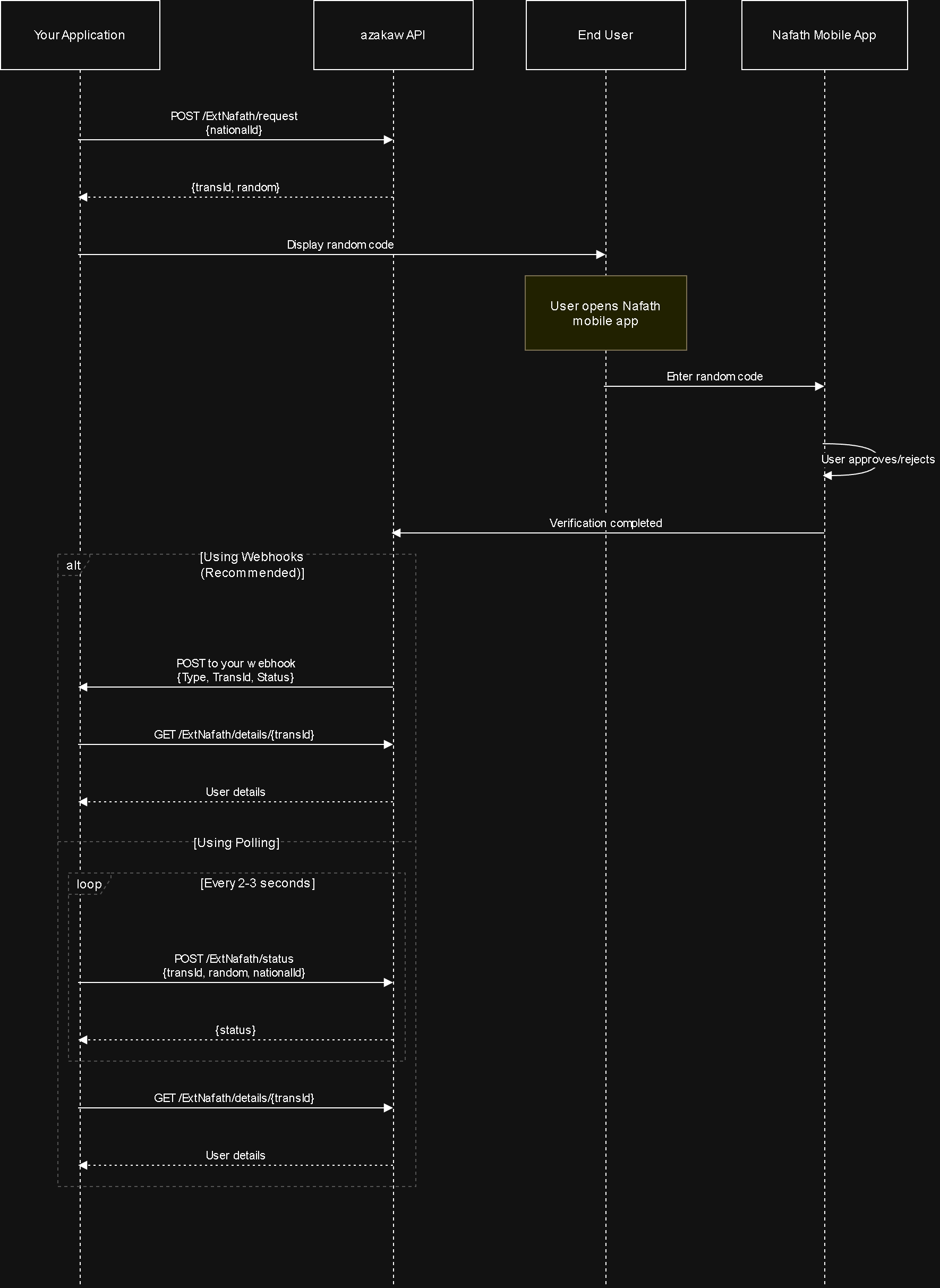
Flow Diagram
The diagram below illustrates the complete Nafath verification workflow, showing both webhook and polling approaches:
Step-by-Step Workflow
Follow this workflow to integrate Nafath verification:
-
Initiate Authentication: Call
POST /ExtNafath/requestwith a national ID to create an MFA request. You'll receive atransIdandrandomnumber. -
Display to User: Show the
randomverification code to the user. The user must enter this code into their Nafath mobile app to approve the request. -
Check Status: Either:
- Poll: Use
POST /ExtNafath/statuswith thetransIdto check the authentication status at regular intervals (every 2-3 seconds), OR - Webhook: Configure a webhook to receive real-time
NafathVerificationCompletednotifications (recommended)
- Poll: Use
-
Retrieve Details: Once status is
COMPLETED, callGET /ExtNafath/details/{transId}to retrieve the verified user information.
Webhook Notifications
Instead of polling the status endpoint, you can configure webhooks to receive real-time notifications when a user completes verification in their Nafath mobile app.
Event Type
The system sends a NafathVerificationCompleted webhook when the verification status changes.
Webhook Payload
{
  "Type": "NafathVerificationCompleted",
  "TransId": "abc123-def456-ghi789",
  "Status": "COMPLETED"
}
Handling Webhook Response
When you receive the webhook notification:
- Verify the Status: Check if the
StatusisCOMPLETED - Retrieve Full Details: Use the
TransIdto callGET /ExtNafath/details/{transId}to get complete user information - Process User Data: Extract the verified user details (name, date of birth, address, etc.) for your application
Benefits
- Real-time Updates: Receive instant notifications instead of polling
- Reduced API Calls: No need for continuous status checks
- Better User Experience: Process verification results immediately
For webhook configuration details, see Webhook Integration.
Error Handling
| Status Code | Description | Solution |
|---|---|---|
| 400 | Bad Request - TransId is required | Ensure transId parameter is provided |
| 401 | Unauthorized access | Check authentication token validity |
| 404 | Transaction not found | Verify the transId is correct |
| 422 | Invalid national ID | Confirm national ID format is correct |
| 429 | Too many requests | Implement rate limiting and backoff strategy |
Rate Limits
To ensure service quality, the following rate limits apply:
- MFA Request Creation: 10 requests per minute per tenant
- Status Checks: 60 requests per minute per tenant
- Details Retrieval: 30 requests per minute per tenant
Exceeding these limits will result in a 429 Too Many Requests response.
Best Practices
-
Polling Strategy: Poll the status endpoint at 2-3 second intervals to balance responsiveness with rate limiting. Implement exponential backoff if needed.
-
Timeout Handling: Set appropriate timeouts for MFA requests (typically 2-5 minutes). After timeout, inform the user and offer to retry.
-
Security:
- Never expose the
randomverification code in client-side logs or error messages - Store the
transIdsecurely and associate it with the user session - Always verify the authentication token before making requests
- Never expose the
-
User Experience:
- Display the random verification code clearly and prominently
- Provide clear instructions: user must enter this code into their Nafath mobile app to approve
- Show real-time status updates while polling
- Handle all possible status types gracefully
-
Error Recovery: Implement retry logic with exponential backoff for transient errors. Log all errors for troubleshooting.
Related APIs
- Webhook Integration - Configure webhooks for real-time verification notifications